Azure Entra ID identity model: Service Principals, Managed Identities from first principles
Aug 14, 2026
Azure resources have no identity by default. This is the full mental model — Entra ID hierarchy, Service Principals, Managed Identities, RBAC, and API permissions — built from first principles, with diagrams.
An Azure Virtual Machine can sit in your subscription, run your code, and hold your secrets in Key Vault, yet have no identity of any kind in Azure Entra ID. No user account. No application registration. Nothing.
That gap between “infrastructure that exists” and “identity that can be authorized” is where most Azure permission confusion starts. If you’ve ever wondered why a VM can’t just read a Key Vault secret by default, or why Managed Identity exists alongside Service Principals, or what the difference even is, this post walks through the whole model from the ground up.
I was getting confused about this while building a retail analytics pipeline where a containerized job needed to pull a database backup from Azure Blob Storage, restore it into Azure SQL, and feed Power BI dashboards. The diagrams below are the ones I wish I’d had on day one.
What is an identity, actually
Strip away all the Microsoft jargon. Any secure system that lets multiple things interact with it faces one core problem: the system needs to know who or what is asking, before it decides what they’re allowed to do.
An identity is a digital stand-in for a person or a piece of software. It’s a record, a set of attributes, that says “this specific entity exists, here’s how to recognize it, and here’s data about it.”
Two kinds of things can have identities:
- Humans — you, logging into email
- Non-human things — applications, services, scripts, VMs, containers — anything that needs to act on its own, without a human typing a password in real time
Authentication vs authorization
These two words get used interchangeably, and that’s the root of most confusion later.
Authentication (AuthN) answers: “Who are you? Prove it.” Input is credentials (password, certificate, biometric). Output is a confirmed identity. It happens first, once per session.
Authorization (AuthZ) answers: “Now that I know who you are, what are you allowed to do?” Input is the confirmed identity plus a request. Output is allow or deny. It happens every time an action is attempted.
A Service Principal can be authenticated successfully and still be authorized to do nothing at all, because it has zero permissions. That’s not a bug, that’s the system working as designed. This explains a huge fraction of “why can’t my app access X even though login worked” problems.
Why humans and workloads need different identity types
A human can respond to an MFA prompt on their phone. A nightly batch job running at 3 AM cannot.
So the mechanics of authentication have to differ, even though the concept, “prove who you are before you’re trusted,” is identical. Entra ID models these as different object types because the risk profile, credential type, and lifecycle are different.
| Human identity | Workload identity | |
|---|---|---|
| Represents | A person | Software (app, script, VM, container) |
| Authenticates via | Password, MFA, biometrics, FIDO keys | Client secret, certificate, or platform-managed credential |
| Logs in | Interactively | Non-interactively, no human present |
The foundation: what lives inside Entra ID
Microsoft Entra ID (formerly Azure Active Directory / Azure AD / AAD, renamed in 2023) is Microsoft’s cloud-based identity provider and directory service. It does two jobs:
- Directory: a database of identities, users, groups, applications, service principals, devices, and their attributes
- Identity provider: the engine that authenticates those identities and issues tokens other systems trust
A tenant is a dedicated, isolated instance of Entra ID for one organization. When your company signs up for Microsoft 365 or Azure, Microsoft provisions you a tenant with its own private directory, walled off from every other customer. The Tenant ID is a GUID that uniquely identifies that instance globally.
Inside a tenant, Entra ID acts as a container for:
- Users — human accounts, each with an Object ID
- Groups — collections of users, each with an Object ID
- Applications — registered apps, each with an Object ID and a globally unique Application (Client) ID
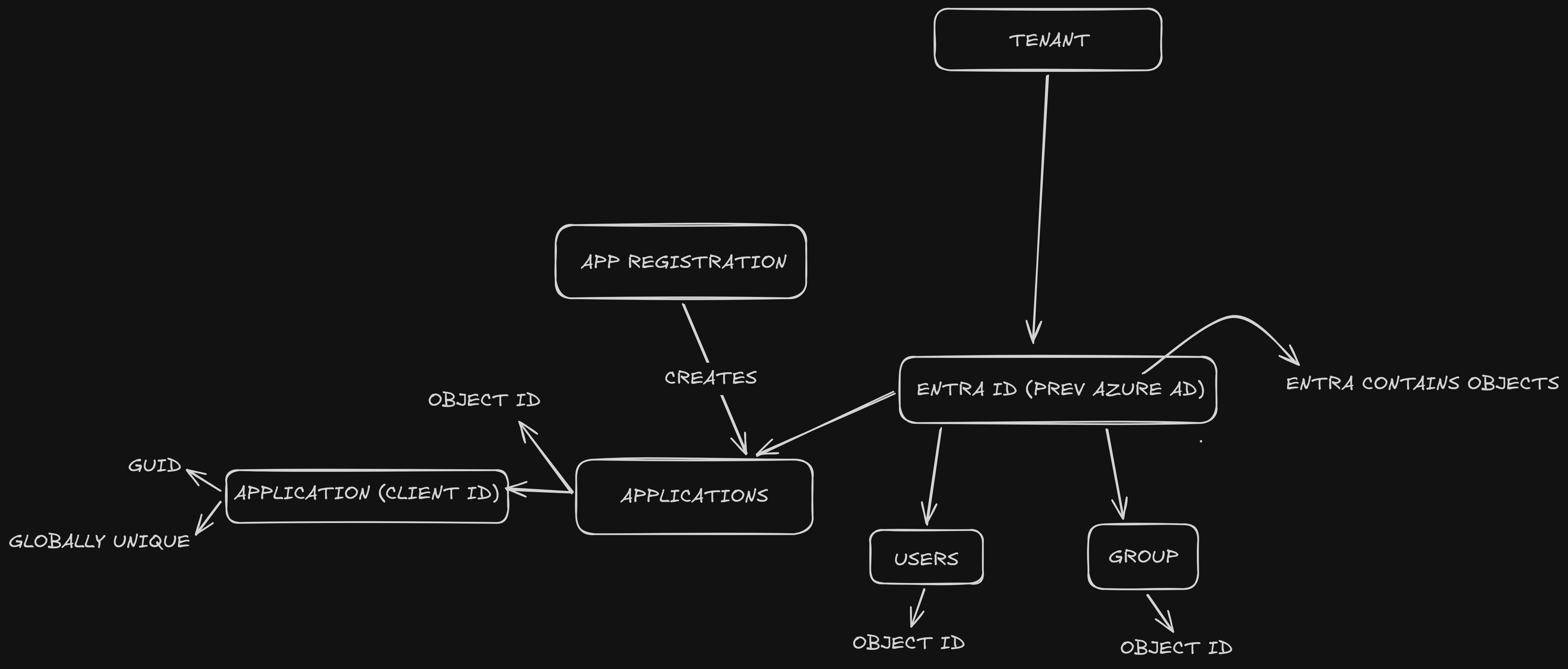
Every object, no matter its type, gets a globally unique Object ID (a GUID) the moment it’s created. “Object ID” is a generic term for the directory-database primary key. A user has one. A group has one. An application has one. A service principal has its own separate one. This will matter a lot, because beginners often assume “an app has one ID.” It actually has at least two different objects, each with its own Object ID, plus a third shared ID.
Azure resources have no Entra ID by default
Here’s the part that tripped me up. A tenant contains both Entra ID (the identity provider) and Azure Resources (the actual infrastructure: VMs, storage accounts, Key Vaults, SQL databases).
But these two worlds are managed separately:
- Entra ID manages identity objects (users, groups, applications)
- Azure Resource Manager (ARM) manages infrastructure, and each resource has a Resource ID path like
/subscriptions/{sub}/resourceGroups/{rg}/providers/Microsoft.Storage/storageAccounts/{name}
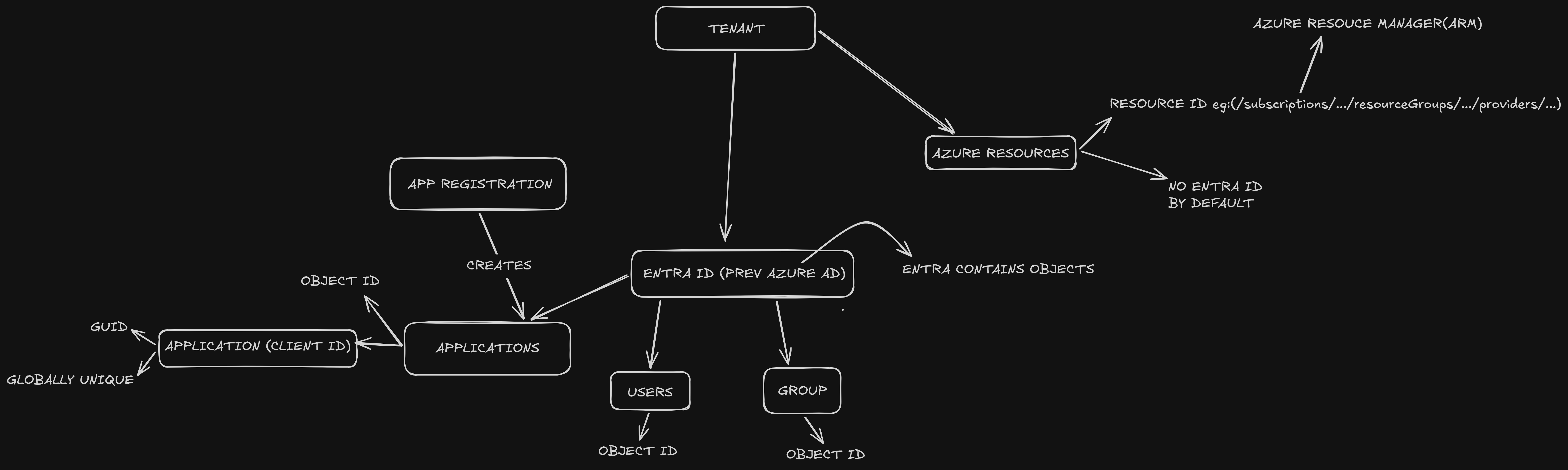
Azure resources do not get an Entra ID identity just by existing. A storage account has a Resource ID, but it has no Object ID in Entra ID, no Client ID, no Service Principal. It’s infrastructure, not an identity.
| Azure Resource ID | Entra Object ID | |
|---|---|---|
| Identifies | A manageable resource in ARM | An identity in Entra’s directory |
| Format | Path-like string (/subscriptions/.../providers/...) |
GUID |
| Used for | Deploying, billing, managing resources | Authentication and authorization |
| Exists by default? | Yes, the moment the resource is created | No, only if given an identity (e.g., Managed Identity enabled) |
The core split: Entra ID knows about identities. ARM knows about resources. Neither automatically knows about the other.
Applications in Entra ID: the blueprint and the instance
When you register an application in Entra ID, the platform creates an Application Object. This is the global definition, the blueprint of your app. Key properties it holds:
- Display name
- Application (Client) ID — a GUID, globally unique, used to authenticate
- Object ID — identifies this specific directory record
- Redirect URIs (where OAuth sends users back after login)
- Requested API permissions
- Supported account types (single-tenant, multi-tenant, personal accounts)
- Credentials configuration (where client secrets and certificates get registered)
The Application object lives in exactly one tenant, the “home” tenant where you registered it. Think of it as the master record of the app, defined once, in one place.
Client ID vs Object ID
This is the single most-confused pair of IDs in all of Entra:
| Client ID (App ID) | Object ID | |
|---|---|---|
| Purpose | Identifies the app when authenticating | Identifies the app object as a row in the directory database |
| Used in | OAuth requests, MSAL config, token requests | Microsoft Graph management calls, portal URLs |
| Shared with Service Principal? | Yes, same value copied onto every SP | No, each SP gets its own unique Object ID |
Service Principals: the authorization bridge
The Application object lives in one home tenant. But permissions in Entra can only be granted to objects that live inside the tenant doing the granting. So the moment any tenant wants to run the app, sign users into it, or grant it permissions, there’s a missing piece: something local, inside that tenant’s directory, that represents “this application, here, in this tenant.”
That missing piece is the Service Principal.
Think of the Application object as a movie, and the Service Principal as a screening license to show that movie in a specific cinema (tenant). The movie is made once, by one studio, in one place. But for any cinema to project it, that cinema needs its own local license acknowledging “yes, we’re authorized to show this here, here’s our local booking data, our local audience restrictions.”
Even your own tenant’s own app needs this. When you register an app via the Portal, Entra creates both objects together in the home tenant (Application object + Service Principal), which is why beginners don’t notice this is two separate objects.
How Service Principals receive permissions
A Service Principal receives permissions through two distinct channels:
-
Azure RBAC role assignments — granted in the ARM layer, on specific resources. For example, assigning “Storage Blob Data Reader” on a storage account. This lets the app read blobs.
-
API permissions — configured on the Application object itself, for calling APIs like Microsoft Graph. For example, granting
Mail.Sendso the app can send email through Graph.
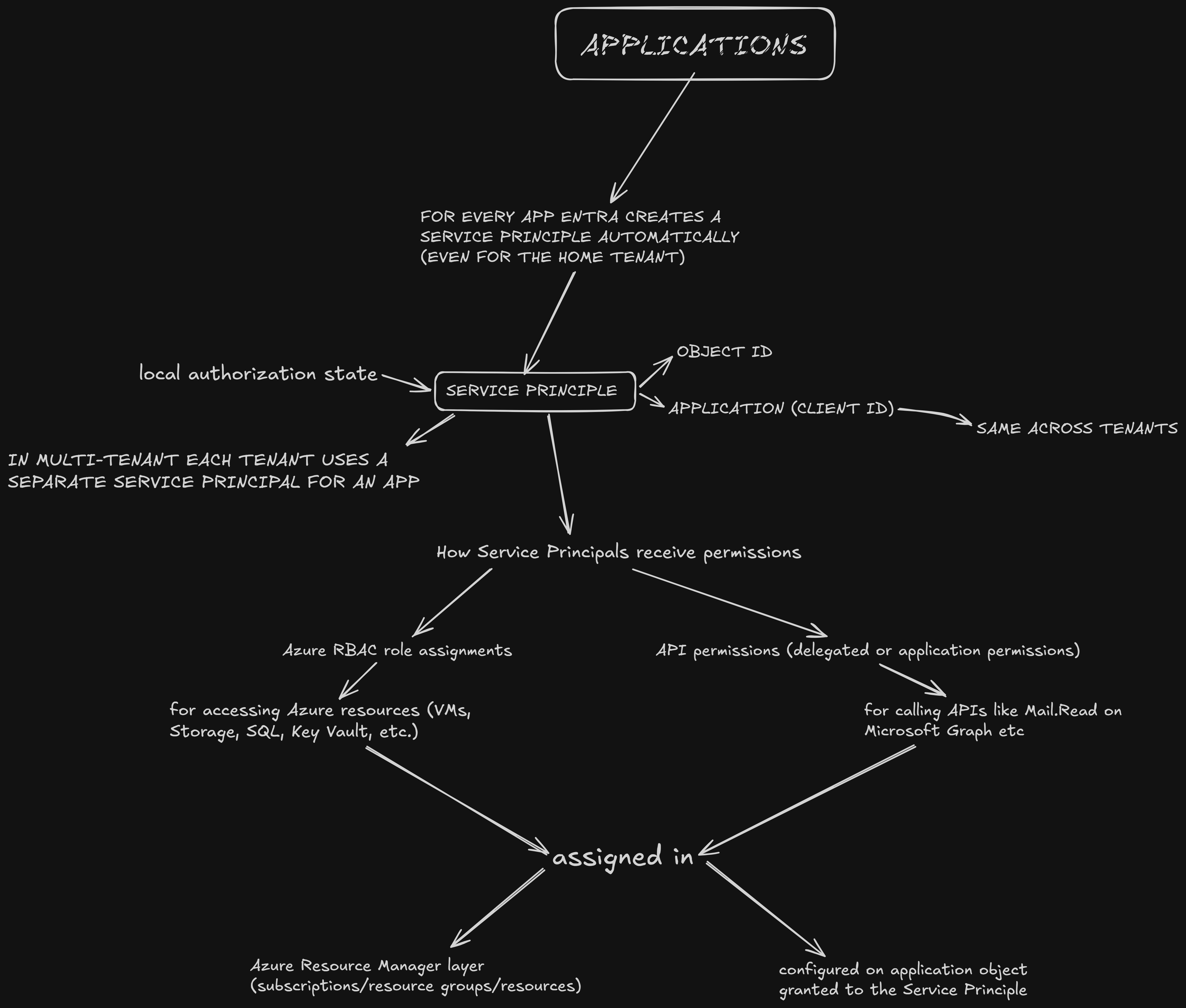
These two channels are separate by design. RBAC answers “what Azure resources can this identity touch?” API permissions answer “what Microsoft APIs can this identity call?” A Service Principal can have both, either, or neither.
How Service Principals authenticate
Since a Service Principal is a workload identity, it can’t type a password and respond to an MFA push. It authenticates using one of:
- Client secret — a long, generated password string, stored in the app’s config or Key Vault
- Certificate — an X.509 certificate; the app proves possession of the private key
Both are configured on the Application object. Someone has to create, store, rotate, and eventually expire that secret or certificate. That’s operational burden and a security liability. Leaked secrets are one of the most common cloud breach vectors. Hold that thought.
The complete picture: Application to Service Principal to permissions
Now put it all together. The Application object doesn’t directly receive any permissions. It creates a Service Principal, and the Service Principal receives both RBAC roles (at the ARM resource level) and API permissions (on the application definition).
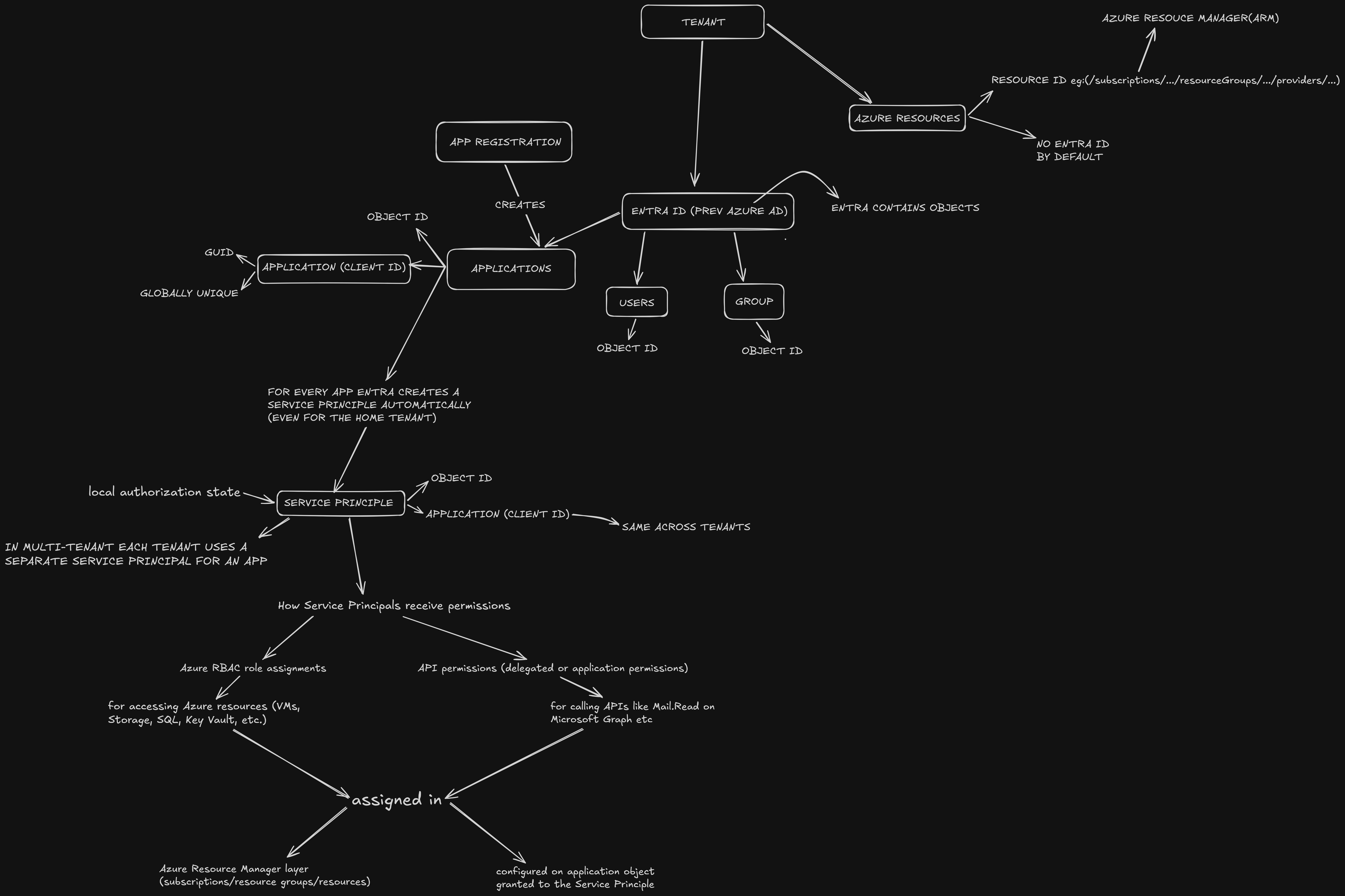
In a multi-tenant scenario, the same Application object (same Client ID) can have separate Service Principals in different tenants. The blueprint is shared, the authorization state is per-tenant. One Application object, many Service Principals, each with tenant-specific permissions.
The Application object never moves and never gets duplicated. It stays in the home tenant forever as the single source of truth. Every tenant that wants to use it gets its own lightweight local pointer, the Service Principal.
Managed Identities: Service Principals without the secret problem
Here’s where it gets interesting. A Managed Identity is not a sibling concept to a Service Principal. It is a Service Principal. Specifically, one where:
- There is no backing Application object (no blueprint — it’s self-contained)
- The credential (a certificate) is generated, stored, rotated, and used entirely by Azure’s platform
- The credential is never exposed to you or your code, ever
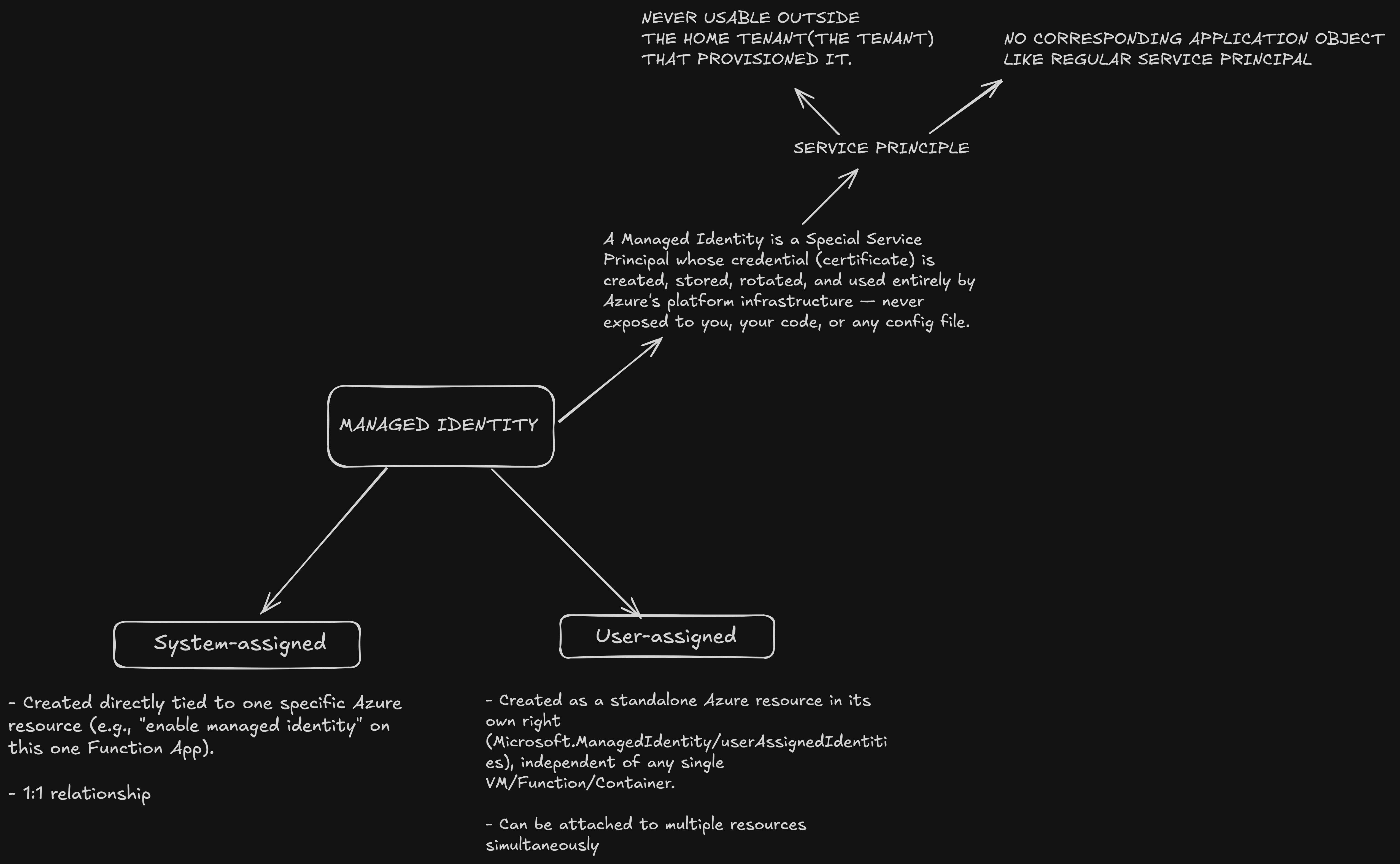
Everything you learned about Service Principals — RBAC role assignments, Object ID vs Client ID, how it gets authorized to access resources — applies identically to a Managed Identity. The only thing that changes is who manages the secret and how the credential physically gets used.
System-assigned vs user-assigned
System-assigned — created directly tied to one specific Azure resource. 1:1 relationship. Lifecycle is bound to the resource: delete the Function App, the identity is deleted too. You can’t reuse it elsewhere.
User-assigned — created as a standalone Azure resource in its own right. Can be attached to multiple resources simultaneously. Lifecycle is independent: deleting a Function App does not delete the identity.
How Azure manages credentials behind the scenes
A Managed Identity–enabled resource can reach a special local, non-internet-routable endpoint. For VMs, this is the Instance Metadata Service (IMDS) at http://169.254.169.254. Your code calls this endpoint saying “get me a token for resource X.” Azure’s platform infrastructure, running underneath your resource, handles presenting the real certificate credential to Entra on your behalf, retrieves the access token, and hands just the token back to your code.
No secret ever appears in your code, environment variables, or config. Azure also handles automatic rotation of the underlying certificate. You never touch it, never see an expiry warning, never manage it.
Service Principal vs Managed Identity: full comparison
| Dimension | “Regular” Service Principal | Managed Identity |
|---|---|---|
| Backing Application object | Yes — blueprint exists in home tenant | No — self-contained |
| Credential type | Client secret or certificate, you manage | Certificate, Azure manages entirely |
| Credential visibility | You can see it, store it, and leak it | Never exposed to you or your code |
| Rotation | Manual (or your own automation) | Automatic, handled by Azure |
| Reusable across tenants | Yes — install the same app into many tenants | No — single-tenant, resource-bound |
| Tied to a specific Azure resource? | No — usable from anywhere | Yes — only from attached resource(s) |
| Creation | Explicit: app registration + secret/cert | Toggle on (system) or create as resource (user) |
| Typical use case | Apps outside Azure, multi-tenant SaaS, CI/CD | Azure-hosted workloads calling other Azure resources |
When to use a regular Service Principal
Use one when your app runs outside Azure — on a laptop, on-prem server, another cloud, or a GitHub Actions pipeline. Managed Identity literally cannot work here because it only functions from within an Azure resource that supports it.
Use one when building a multi-tenant SaaS app that other companies install into their own Entra tenants. Managed Identity has no Application object, so there’s nothing portable to install elsewhere.
When to use a Managed Identity
Use one when any workload runs on Azure and needs to call other Azure or Graph resources. This should be the default for Azure-to-Azure calls, almost without exception.
- Azure Function reading secrets from Key Vault
- Container App writing to Azure SQL
- VM calling Azure Storage
- Logic App calling Microsoft Graph
Why Managed Identity is generally preferable for Azure workloads
Every credential that a human manages is a credential that can be:
- Committed accidentally to a public GitHub repo
- Left in a config file with overly broad permissions
- Forgotten and left unrotated for years
- Phished, intercepted, or leaked through misconfigured logging
A Managed Identity credential never exists in any form a human or application can access. It lives inside Azure’s internal platform, is short-lived, and rotates automatically. This eliminates an entire category of breach vector — leaked long-lived secrets — which is empirically one of the most common root causes of cloud security incidents.
The tradeoff is narrow scope: Managed Identities only work from Azure resources, within a single tenant. That’s precisely why they’re not a universal replacement for Service Principals. They’re the strongly preferred default when the workload runs on Azure, and the wrong tool when it doesn’t.
Why Microsoft didn’t need a new authorization system
Entra ID’s authorization engine — RBAC assignments, API permission grants, Conditional Access policies — is built to operate on one kind of object: a Service Principal. Rather than inventing a parallel authorization system for platform-managed identities, Microsoft made a Managed Identity be a Service Principal under the hood.
The result: every az command, every RBAC role assignment, every Conditional Access policy that already knows how to handle Service Principals automatically works on Managed Identities. No new tools, no new permission model, no new learning curve. The only new machinery was the credential-issuing backend.
This is the “vehicle vs electric vehicle” distinction. Every Managed Identity is a Service Principal. Not every Service Principal is a Managed Identity.
FAQ
Can Azure SQL tell whether a caller is a Service Principal or a Managed Identity?
No. Both authenticate through Entra ID’s token endpoint and receive access tokens in the same format. The receiving resource (Key Vault, SQL, Storage, Graph) treats a token from either type identically. From the token alone, the resource cannot distinguish between a manually-created Service Principal and a Managed Identity.
Can I attach a Managed Identity to a workload running on AWS EC2 or my local laptop?
No. Managed Identities only work from within Azure resources that support them. If your workload runs outside Azure, use a regular Service Principal with a client secret or certificate that you manage yourself.
What happens to a system-assigned Managed Identity when the resource is deleted?
The identity is deleted along with the resource. This is the 1:1 lifecycle binding. If the resource is recreated later, a brand new identity with a new Object ID is created, and all RBAC role assignments pointing to the old Object ID must be re-granted.
Why use a user-assigned Managed Identity instead of system-assigned?
For workloads that are repeatedly created and destroyed (containerized jobs, ephemeral scale-out instances), a user-assigned identity gives you a stable Object ID. You create it once, grant permissions once, and attach it to every resource that needs it. No permission churn on every resource lifecycle event.
Does a Managed Identity have a Client ID like a Service Principal?
Yes. Both have a Client ID (Application ID). But a Managed Identity has no corresponding Application object in Entra ID. The Client ID is assigned directly to the Service Principal object, with no blueprint behind it.
Where to go next
- Managed identities for Azure resources — Microsoft Learn
- Application and service principal objects in Entra ID
- Assign Azure roles using the Azure portal
If you’re wiring this up for a real pipeline, start with a user-assigned Managed Identity, grant it the minimum RBAC role on the specific resource (not the resource group), and avoid the temptation to use a shared Service Principal with a long-lived secret. Your future self, and your security review, will thank you.